
Molten Canal (Tap)
Pours metal out of the far end of a canal.
A Molten Canal (Tap) is a canal cell with a drain on it: park a barrel or one of the two large molds underneath with a sneak right-click, then sprint right-click to toggle the pour, which drains at 20 units per second. Closing the pour severs the canal at this cell, so nothing backs up behind a shut tap. It is the fitting to use for the anvil and helve hammer molds, which are too large for a pedestal. See Casting for filling a mold this way and Molten metal for the run feeding it.
Interaction
- Right-click to toggle pouring
- Right-click to chip out solidified metal
- Right-click to toggle tap pouring
- Right-click to place barrel or mold
- Right-click to remove barrel or mold
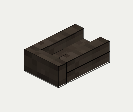
 front
front right
right back
back left
left top
topMade by
| any Hammer (tool, not consumed) | Fire clay x 4 | any Chisel (tool, not consumed) |
| Molten Canal (Tap) | ||
Needs: 4 Fire clay, a Hammer (kept), a Chisel (kept); makes 1 Molten Canal (Tap)
Amounts are the mod's defaults; the recipe-cost level changes them (see Commands and config).